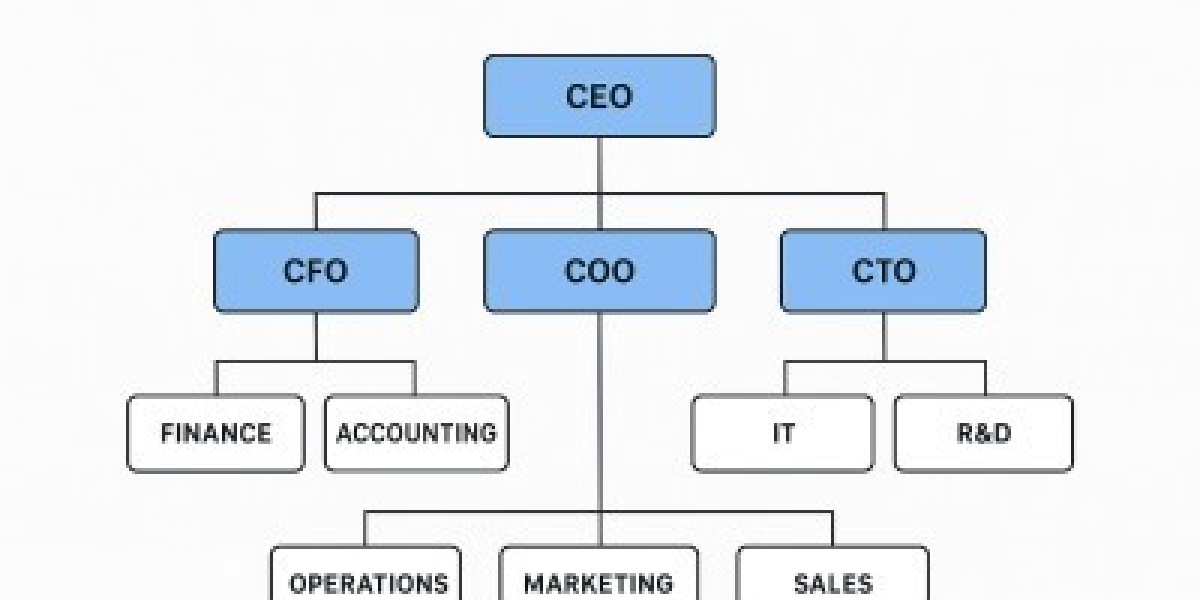

This article explores the concept of an org chart, its benefits, common types, practical tips for creating one, and why it is essential for modern businesses.
1. What Is an Org Chart and Why It Matters
An org chart provides a clear illustration of an organization’s hierarchy. It visually maps out the reporting lines between employees, teams, and departments. This clarity helps in multiple ways:
Improved Communication: By showing reporting structures, org charts help employees know whom to contact for specific issues or approvals.
Role Clarity: Employees understand their responsibilities and how their work connects with others.
Strategic Planning: Leadership can analyze workforce allocation and identify gaps in staffing or management.
Onboarding and Training: New hires can quickly see the structure of the company and learn the chain of command.
For large companies, an org chart is more than a diagram; it’s a tool that ensures smooth operation across multiple levels and locations.
2. Common Types of Org Charts
Org charts can vary depending on an organization’s size, culture, and operational model. Here are some widely used types:
a. Hierarchical Org Chart
The hierarchical org chart is the most traditional type. It displays a top-down structure where each employee reports to one manager. This type is common in large corporations, government agencies, and structured organizations.
Benefits:
Clear chain of command
Easy to understand roles and responsibilities
Suitable for decision-making processes
Limitations:
Can be rigid
May limit collaboration across departments
b. Matrix Org Chart
Matrix org charts combine functional and project-based reporting structures. Employees may report to more than one manager—typically a functional manager and a project manager.
Benefits:
Encourages collaboration across teams
Efficient resource allocation for projects
Supports complex, multi-functional workflows
Limitations:
Can create confusion if roles are not clearly defined
May lead to conflicts between managers
c. Flat Org Chart
A flat org chart has few or no levels of middle management. Employees report directly to top leadership or team leads. Startups and small businesses often adopt this structure to encourage collaboration and quick decision-making.
Benefits:
Promotes a culture of openness
Encourages innovation and quick communication
Reduces bureaucracy
Limitations:
May be unclear in terms of authority
Can be challenging to scale as the organization grows
d. Divisional Org Chart
Divisional org charts divide the organization based on products, services, or geographic regions. Each division operates as a semi-autonomous unit with its own hierarchy.
Benefits:
Focused management for each division
Easier to measure performance of specific units
Adaptable to regional or market-specific needs
Limitations:
Can create duplication of functions
May reduce efficiency across divisions
3. Key Components of an Org Chart
A standard org chart usually contains the following elements:
Positions/Titles: Represent employees or roles in the organization.
Reporting Lines: Lines or arrows showing who reports to whom.
Departments/Teams: Groups that organize employees based on function or specialization.
Roles and Responsibilities: Brief descriptions may be added to clarify functions.
By combining these elements, an org chart provides both clarity and structure, making it easier to manage workflows, accountability, and collaboration.
4. Benefits of Using an Org Chart
An org chart offers multiple advantages to businesses, employees, and leadership:
a. Enhances Communication
Employees know exactly who to approach for approvals, guidance, or collaboration. This clarity reduces miscommunication and enhances productivity.
b. Supports Workforce Planning
Leaders can identify gaps, redundancies, or underutilized resources. Org charts are particularly useful for succession planning and hiring strategies.
c. Streamlines Decision-Making
With a clear chain of command, decision-making is faster and more efficient, as it is clear who holds authority in each area.
d. Improves Accountability
Each role has a defined responsibility. Employees are aware of their duties and whom they report to, promoting accountability across the organization.
e. Facilitates Onboarding
New employees can quickly understand organizational relationships, hierarchy, and key contacts, reducing the learning curve and boosting productivity.
5. How to Create an Effective Org Chart
Creating a clear and useful org chart requires careful planning. Here are some practical tips:
a. Define Your Purpose
Determine why you are creating the org chart—whether for internal communication, project planning, or workforce management.
b. Gather Accurate Information
Collect up-to-date information about all employees, roles, reporting lines, and departments.
c. Choose the Right Type
Select a chart type that fits your organization’s structure—hierarchical, matrix, flat, or divisional.
d. Keep It Simple
Avoid clutter. Focus on key roles, reporting relationships, and departments. Use colors or shapes to differentiate teams if necessary.
e. Update Regularly
Organizations evolve, and so should your org chart. Regular updates ensure it remains an accurate reference tool.
f. Use Visualization Tools
Software like Lucidchart, Microsoft Visio, or online diagram tools can help create professional and interactive org charts that are easy to share and update.
6. Modern Trends in Org Charts
The traditional org chart is evolving to match the needs of dynamic workplaces:
Digital Org Charts: Interactive digital charts allow real-time updates and integration with HR systems.
Cross-Functional Teams: Charts increasingly highlight collaborative teams rather than just hierarchical relationships.
Skills-Based Mapping: Some org charts focus on employee skills and project capabilities rather than job titles.
Global Structures: For multinational organizations, org charts may represent global reporting lines and regional operations.
These trends make org charts more than just a static diagram—they become dynamic tools for workforce planning, collaboration, and strategy.
7. Common Mistakes to Avoid
When creating an org chart, avoid these pitfalls:
Overloading it with unnecessary details, making it confusing.
Ignoring updates as staff roles and reporting lines change.
Using unclear or inconsistent symbols and colors.
Focusing only on hierarchy, neglecting collaboration and cross-functional relationships.
A well-designed org chart balances clarity, accuracy, and usability, ensuring it serves its intended purpose effectively.
FAQ: Common Questions About Org Charts
1. What is the main purpose of an org chart?
The main purpose of an org chart is to visually represent the structure of an organization, clarify reporting relationships, define responsibilities, and improve communication.
2. What are the different types of org charts?
The most common types include hierarchical, matrix, flat, and divisional org charts, each serving different organizational needs and styles.
3. How often should an org chart be updated?
An org chart should be updated whenever there are significant changes in roles, reporting lines, or departments. For large organizations, quarterly or biannual updates are common.
4. Can small businesses benefit from an org chart?
Yes, even small businesses can benefit. Org charts help clarify roles, responsibilities, and reporting structures, supporting efficient communication and planning.
5. What tools can be used to create an org chart?
Popular tools include Microsoft Visio, Lucidchart, Canva, SmartDraw, and online HR management software that offers interactive org chart features.
This article provides a comprehensive overview of org charts, highlighting their importance, types, creation tips, and modern trends. Understanding org charts allows businesses to operate efficiently, maintain clear communication, and adapt to evolving organizational needs.